โ† Home District
๐Ÿ“ฆ

THE DEPOT

Self-Hosted Private File Vault

Active Self-Hosted Python Flask SQLite Docker

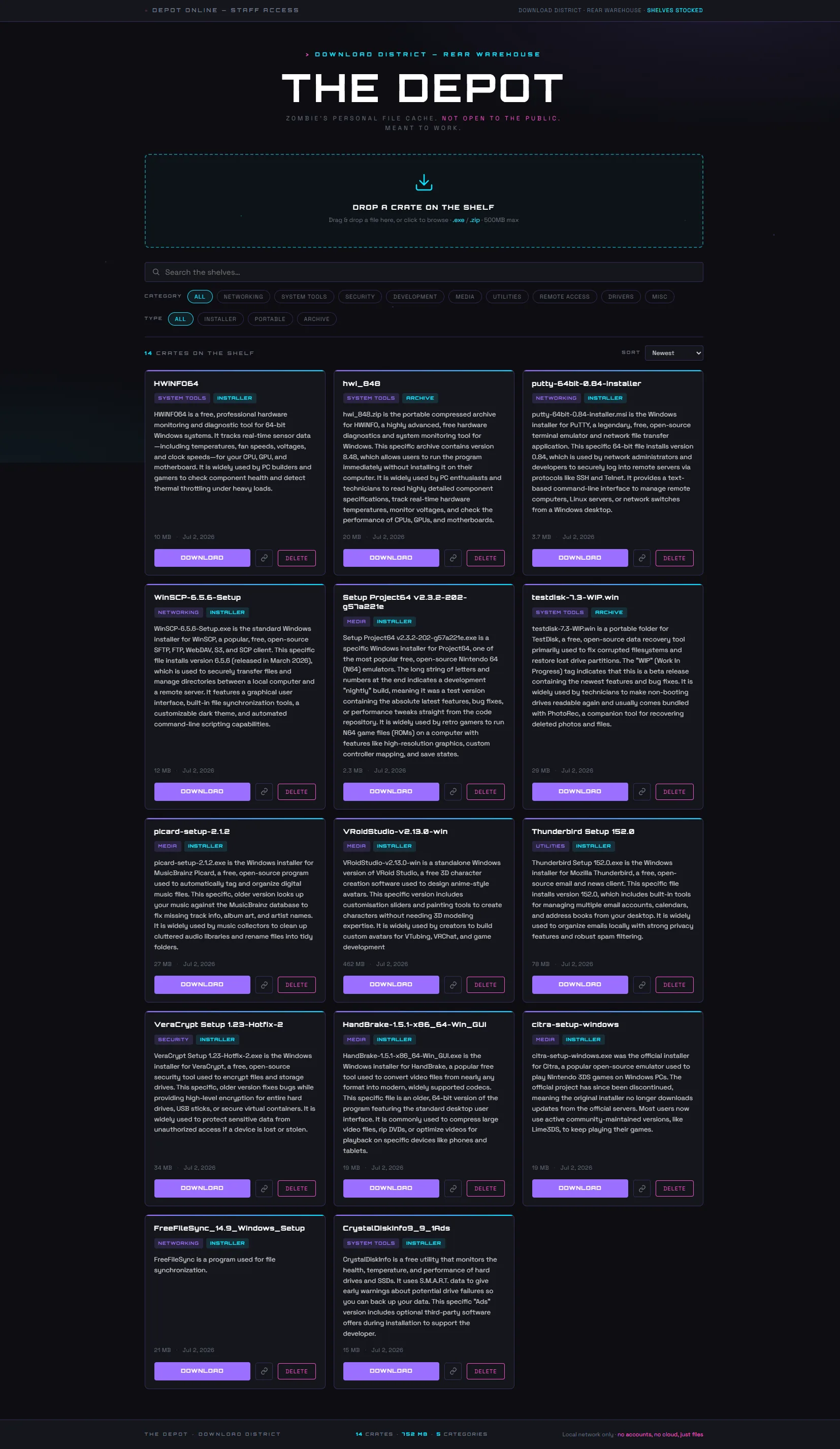
The back-room storeroom behind Download District. A private, self-hosted web app for storing and retrieving installer and tool files โ€” organised by category, fast to search, zero cloud. Built for one person who knows what they need.

The Depot is a single Docker container running on the home lab, reachable from any device on the local network. Its one job: store .exe and .zip files, organised by category, and make them fast to find and download when a job needs them. No login, no cloud, no accounts. Local network only. Just files, organised, available.

The smart bit is the auto-describe feature โ€” when you drop a file, The Depot guesses a clean name, web-searches it, and suggests a one-line description and best-guess category. Both go into the form for you to keep or edit. Nothing is committed automatically. A "Look it up" button re-runs the search on demand.

Every upload is SHA-256 hashed. Re-uploading the same bytes is blocked with a clear message, even under a different filename. Two genuinely different files that happen to share a name still coexist fine.

500 MB per file cap
9 Categories
6 API Routes
1 Container
๐Ÿ“ฅ

Store

  • โ€บ Drag-and-drop or click-to-browse upload
  • โ€บ .exe and .zip files, up to 500 MB each
  • โ€บ Each file filed with: name, category, type (Installer / Portable / Archive), optional description
  • โ€บ Auto-describe: guesses name + description + category from the filename via DuckDuckGo Instant Answer โ€” editable before saving
  • โ€บ SHA-256 de-duplication โ€” same bytes blocked even under a different filename
๐Ÿ”

Browse & Find

  • โ€บ Crate grid showing name, badges, size, date, description
  • โ€บ Sort: Newest ยท Oldest ยท Name Aโ€“Z ยท Largest ยท Category
  • โ€บ Search: real-time client-side, matches name / description / filename
  • โ€บ Filter: category and type pills, stackable (e.g. Networking + Portable)
  • โ€บ Footer stats: live count of crates, total size, categories in use
๐Ÿ“ค

Retrieve & Manage

  • โ€บ One-click download โ€” original filename preserved exactly
  • โ€บ Copy link โ€” copies the absolute download URL to paste into another machine
  • โ€บ Delete โ€” two-step confirm (Delete โ†’ "Sure?") so nothing goes by accident
  • โ€บ Deletes both the DB row and the file on disk
  • โ€บ Keyboard: / jumps to search, Esc cancels upload or clears search

Fixed list in code โ€” keeps the UI clean. New categories are a one-line code change.

Networking System Tools Security Development Media Utilities Remote Access Drivers Misc

Small Footprint. Fast to Load.

The entire UI lives in a single templates/index.html file โ€” CSS and JS inline, no framework, no build step. After initial load, all search, filter, and sort operations are client-side and never round-trip to the server.

The Flask backend handles only what it needs to: file I/O, database writes, hashing, and the one external call โ€” a DuckDuckGo Instant Answer lookup using Python's standard library (urllib only, no API key). Everything else is fully local.

Files are stored on disk as <id>_<originalname> โ€” the ID prefix prevents collisions while the original name is preserved in the database and handed back verbatim on every download. In Docker both the files and the SQLite database live in a single /app/data directory that is bind-mounted to the host, so data survives every rebuild.

DATA FLOW
Upload โ†“ SHA-256 hash โ†’ duplicate? block โ†“ Write to disk _ โ†“ SQLite row name, category, type, description, size, hash Download โ†“ Serve file original filename preserved exactly Auto-describe โ†“ DuckDuckGo API (stdlib urllib, no key) โ†“ Suggest name + category editable before save
Method Route Purpose
GET / Serve the UI
GET /api/files All file metadata as JSON
GET /api/lookup?filename=โ€ฆ Suggest a description + category from a filename โ€” not saved
POST /api/upload Multipart upload + metadata; hashes and de-dupes
GET /api/download/<id> Serve the file with its original filename
DELETE /api/delete/<id> Remove file and metadata row
SQLITE โ€” files TABLE
CREATE TABLE files ( id INTEGER PRIMARY KEY AUTOINCREMENT, name TEXT NOT NULL, filename TEXT NOT NULL, -- original name, returned verbatim on download category TEXT NOT NULL, type TEXT NOT NULL, -- Installer | Portable | Archive description TEXT, size_bytes INTEGER, sha256 TEXT, -- exact-duplicate blocking uploaded_at DATETIME DEFAULT CURRENT_TIMESTAMP );

Older databases are auto-migrated to add the sha256 column on startup โ€” no manual migration needed.

Content-based de-duplication
De-duplication is by SHA-256 hash, not filename. The same tool downloaded twice is rejected; two different tools that share a name are both allowed.
Auto-describe suggests, never decides
Every guess from the DuckDuckGo lookup is editable before saving. The Depot removes the busywork without taking control away.
Single mounted data directory
Both uploads and the SQLite database live under one bind-mounted /app/data directory. Binding the DB as a lone file would cause Docker to silently create a directory instead, breaking SQLite.
Fixed category list in code
Categories are defined in app.py, not stored in the database. Keeps the UI clean. New categories are a one-line code change, not a UI feature.
Everything client-side after load
Search, filter, and sort never round-trip to the server. All file metadata is loaded once at page load; all operations run in the browser.
Two-step delete
Delete button changes to "Sure?" before committing. Prevents accidental deletion with no undo โ€” the file and its DB row are both removed permanently.
Python 3Backend language
FlaskWeb framework โ€” lightweight, no ORM needed
gunicornProduction WSGI server โ€” 2 workers, 600s timeout for large uploads
SQLiteOne file, no server โ€” auto-migrated on startup
DockerSingle container, builds from source
Vanilla HTML/CSS/JSEntire UI in one template โ€” no framework, no build step
urllib (stdlib)DuckDuckGo Instant Answer lookup โ€” no API key, no third-party lib
hashlib (stdlib)SHA-256 for content de-duplication
PortainerContainer management on the home lab
THE DEPOT โ€” FILE VAULT UI
The Depot UI